



Behringer DSP1100 and 1124P eSSB
|
| Main Filters:
Filter #1: Bass Frequency: 50 to 80 Hz (Depending
on voice characteristics, lower voices stay low, higher voices stay high)
Bandwidth: 30/60 (1/2 Octave -- Some voices
could use 20/60 (1/3) and some 45/60 (3/4) octaves
Fine Tune: Adjust to suit your voice and taste
exactly
Gain: Boost @ +6 db to +16 db (depending
on how big of a bottom you want)
Filter #2: Lower midrange
Frequency: 160 Hz (This filter is a must! This
frequency should be cut to remove "Boominess")
Bandwidth: 120/60 (2 Octaves -- This is the
first half of the midrange cut)
Fine Tune: None
Gain: Cut @ -6dB to -15dB (depending on
how "Boomy" your voice/mic/radio is in this area)
Filter #3: Midrange
Frequency: 600 to 640 Hz (depending on
voice characteristics to remove "Tinnyness")
Bandwidth: 120/60 (2 octaves -- This is the
second half of the midrange cut)
Fine Tune: 0 ~ -6 (depending on exact frequency
needed)
Gain: Cut @ - 6dB to -15dB (the cut value
on this filter should be the same as filter #2 for consistency)
Filter #4: High Midrange / Treble
Frequency: 3.5 to 4.5 kHz (depending on
the radio -- For 950 use 4.5kHz, for 870, Icoms, Yaesu's use 3.5kHz)
Bandwidth: 30/60 (Some voices/radios may need
45/60 or 60/60 to spread down to 2 ~ 3kHz range)
Fine tune: Adjust to suit your voice and taste
exactly
Gain: Boost @ +8db to +16dB (depending
on how "Airy" you want it -Suit your taste)
Optional Filters:
Filter #5: Treble Polish
Frequency: 4 to 5 kHz (Depending on Voice/Mic/Radio
-- Add this filter for enhancing the high-end further)
Bandwidth: 20/60 (1/3 Octave or less -- Keep
it narrow! Otherwise it will add Tinnyness)
Fine Tune: Adjust for what is most effective through your TX filters) Gain: Boost @ +6 to +12 dB (Just enough
to polish)
Filter #6: Upper Midrange Fine Tune
Frequency: 1.6 to 2 kHz (depending on Voice/Mic/Radio
-- usually a small cut removes "Brittleness")
Bandwidth: 45/60 to 60/60 (3/4 to 1 octave usually
works nice to remove any "Brittle" sounds with SSB)
Fine Tune: Adjust for what sounds "Natural"
Gain: Cut @ -4 to -8 dB (depending on how much
harshness you want to remove)
Behringer DSP1100 1124 Tips and Notes: Keep input levels adjusted so that the DSP output levels are below -6dB.
There is no output gain control on the 1100/1124 and digital clipping will occur if the digital output exceeds -3dB. So, again, keep
the input level low enough to not exceed about -6dB on the digital output of the 1100/1124.
In some filter combinations, you may notice a weird processor hum or low tone. This seems to be a digital audio loop of some kind. To remove this processor tone, simply change your memory channel to the " - - " channel just below memory ch 1. The tone should disappear. Then, return to the memory channel you were working with and see if the tone is gone. If it is, then press the "STORE button twice to save the program. The saved program should now be tone free! If you create a program that you like, and you want to make a backup, here is a nice way to do it. Let's say you are using only the LEFT channel for your EQing. Once you have set up your Left channel program, press and hold the "ENGINE L" button then the hit the "ENGINE R" button and the program will copy itself to the Right channel. Now, if you ever accidentally "Mess-up" the program, just copy the Right Channel back to the Left channel by pressing and holding the "ENGINE R" button, then hit the "ENGINE L" button to transfer the Right channel to the Left channel. The DSP1100/1124 Software programs version 1 & 2 are downloadable by clicking the link at the top of this page or by selecting it from the "SSB TX Setup" menu. Version 2 is an updated version of version 1 but still has some significant bugs, so beware! For a graphical representation of your EQ curve, version 1 is still a better version for this purpose. The DSP 1100/1124 is connected to your computer via midi cables from your computer sound card MIDI in/out connectors (if available) or more typically via your computer's Game/MIDI port. So, there are two possible ways to interface the 1100/1124 to your computer: 1) A pair of standard midi to midi (in/out) cables if your sound card has standard midi in/out jacks. 2) A special cable with 2 DIN-5 Male midi connectors on one end and a DB-15 Male plug on the other end for game cards that use the DB15 in/out jack. There are also cables available that have a DB-15 Female connector added for a Joystick passthrough if you play games that require the use of your joystick. These cable costs about $20.00 and is available at most music outlets. The software is very useful, even if you only want to use it to display a graphical image of your programmed EQ curve. Just plug in your settings in the software and you will see a nice graph of your resulting curve. Also, the software will let you see how your Frequency / Bandwidth / Gain settings effect the graph to better understand the relationship of these settings with a graphical picture. NOTE: To perform a hardware reset of the unit to factory default, do the following: 1) Power OFF the DSP1100/1124 2) Press and hold the "STORE" and "FILTER SELECT" buttons while turning on the unit. (Keep pressed for about a second after the DSP-1100/1124 is tuned on)
Have fun and may you find that "Sweet sweet sound"
you have been looking for, using your DSP 1100/1124P! John (NU9N)
|
 Click
here to download version 1 of the Behringer DSP-1100/1124P midi software control program
Click
here to download version 1 of the Behringer DSP-1100/1124P midi software control program With the following
initial settings, the Behringer DSP1100/1124P should play nicely. Of course, every voice/mic/radio will effect how the 1100/1124 is fine
tuned. Here are some suggested starting points for SSB Full-Range Audio using a good dynamic type microphone. Note: Condenser
type microphones may need less Bass and more Treble.
With the following
initial settings, the Behringer DSP1100/1124P should play nicely. Of course, every voice/mic/radio will effect how the 1100/1124 is fine
tuned. Here are some suggested starting points for SSB Full-Range Audio using a good dynamic type microphone. Note: Condenser
type microphones may need less Bass and more Treble.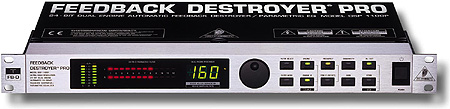
John M. Anning - NU9N
e-Mail:  |
Home | Intro | About
| Rx | Tx | Extended SSB | AM | Rec/Play
| Photos | Feedback | Sites | MP3
Apologetics 1 | Apologetics 2 | Audio Glossary | Donate | eSSB Mods | eSSB Ready Rigs | Transmitter Settings for eSSB
File Downloads | News | Radio Connections | Transmitter Settings | Scope Your Audio | Site Map | Site Search | T-Pad Calculator
Apologetics 1 | Apologetics 2 | Audio Glossary | Donate | eSSB Mods | eSSB Ready Rigs | Transmitter Settings for eSSB
File Downloads | News | Radio Connections | Transmitter Settings | Scope Your Audio | Site Map | Site Search | T-Pad Calculator
